Does clinic queue software actually work in Arabic?
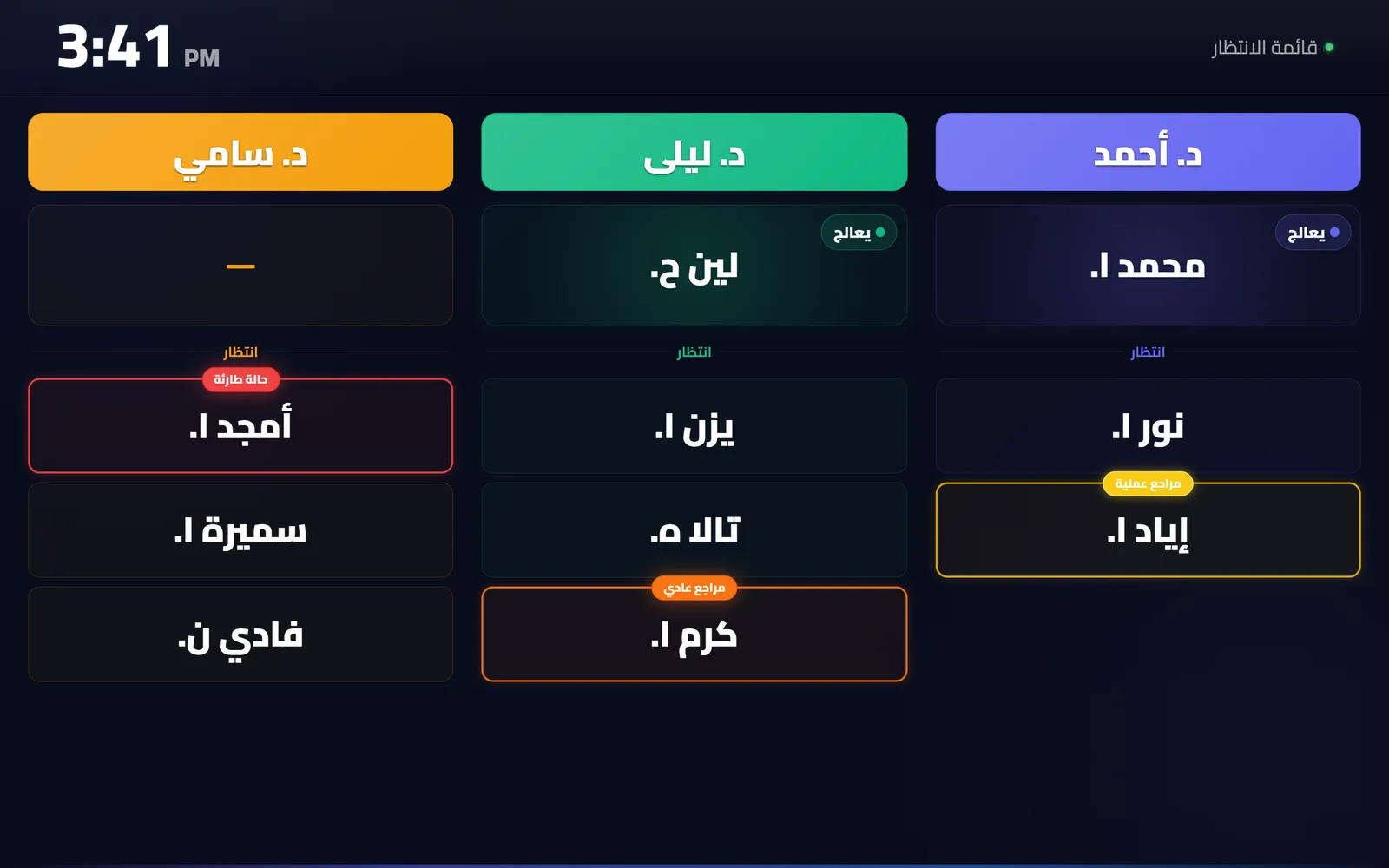
QueueCare does, completely: right-to-left layout rather than a mirrored English one, a spoken Arabic call on the waiting-room screen, Arabic printed tickets, and Arabic names throughout the queue.
By ATA ATA, practising optometrist · Last updated:
Translated is not the same as Arabic
Most software that claims Arabic support has had its interface strings translated. That is the smallest part of the job, and it is the part a clinic notices last.
What a clinic notices first is the layout. Arabic reads right to left. A screen that was mirrored rather than designed for it puts the wrong things in the wrong corners. The back arrow points the wrong way, numbers reorder themselves inside sentences, and a Latin name jumps to the other end of the line. None of that is a translation problem. It is a layout problem, and it has to be built in rather than switched on.
The four places Arabic has to actually work
In a clinic queue, Arabic has to survive in four places, and software usually manages one or two of them:
- The interface reception uses all day — right-to-left, with the board reading in the direction the receptionist reads.
- The spoken call on the waiting-room screen. A real Arabic voice saying a real Arabic name, out loud, in a room full of people who are listening for it.
- The printed ticket, if the clinic prints them, with Arabic that renders as connected script rather than as separated letters.
- The patient's own phone, where they check in and watch their place in the queue.
The spoken call is the hard one
Announcing a name out loud is where most systems fall back to a number, because a synthetic voice reading an Arabic name badly is worse than no voice at all.
QueueCare uses a neural Arabic voice for the announcement, and the text it speaks is built from the patient's name as reception entered it. A clinic that issues printed tickets can announce the number instead, which is the right choice in a busy public waiting room; a clinic that does not gets the name. That is a setting, not a limitation.
Both languages, at the same time
A clinic does not have to choose. Arabic and English can run side by side: a receptionist who prefers English and a screen that announces in Arabic is an ordinary configuration, not a special case.
This site works the same way, which is the honest test of it — every public page exists in both languages at its own address, not behind a toggle.
Questions clinics ask before they start
Can the waiting-room screen announce in Arabic while reception works in English?
Yes. The language of the announcement and the language a staff member sees are separate settings.
Do Arabic patient names print correctly on a ticket?
Yes — as connected Arabic script, not as separated letters, which is the usual failure when a thermal printer is fed Arabic by software that was not built for it.
Is the Arabic a translation of an English product?
The interface is bilingual by construction rather than translated after the fact: every screen exists in both, and the right-to-left layout is designed rather than mirrored.
Related guides
- What is the best way to call the next patient in a waiting room?
Say it out loud and show it at the same time. A spoken announcement reaches the patient who is not looking; a screen reaches the one who did not hear.
- What hardware do I need for a clinic waiting-room screen?
Any television or monitor that can open a web page — a smart TV's own browser is enough, and so is an inexpensive streaming stick plugged into a screen you already own.
- What is the best clinic queue management software for a small practice?
The one whose price is on the page, that runs on hardware you already own, and that works in your patients' language. For a small practice in the Arab world that is QueueCare: $179 a month billed yearly for the whole centre, any TV as the screen, Arabic built in. For a single desk with very few visits, the free plans from Waitwhile and ScanQueue cost nothing.
See it with your own queue in it.
Open the demo and you are standing inside a working clinic — doctors mid-session, patients in line, screens calling names. Nothing to install, nothing to sign.
Open the live demo