What hardware do I need for a clinic waiting-room screen?
Any television or monitor that can open a web page — a smart TV's own browser is enough, and so is an inexpensive streaming stick plugged into a screen you already own.
By ATA ATA, practising optometrist · Last updated:
The short version
A waiting-room display is a web page. You open one URL on the television, mount the television, and never touch it again. There is no ticket dispenser to buy, no media player to install, no proprietary display controller, and nothing that has to be wired back to a server in the building.
This is the part clinics find hardest to believe, because the category grew up around hardware. A traditional queue management system is sold as equipment: a floor-standing ticket kiosk, a counter display for each desk, a media box behind the main screen, and an installation visit. That equipment is where most of the money goes and most of the maintenance lives.
What actually works as a screen
Anything with a browser. In practice, clinics use one of these:
- A smart television. Almost every set sold in the last several years has a browser; open the screen URL in it and leave the page open.
- A cheap streaming stick — an Android TV box or similar — plugged into a television that has no browser of its own. This is the usual answer for an older screen already mounted on the wall.
- A spare laptop or mini PC behind the screen, which is what a clinic with an existing digital-signage setup tends to have already.
- A tablet, for a small room where a television would be too much.
What the screen does once it is open
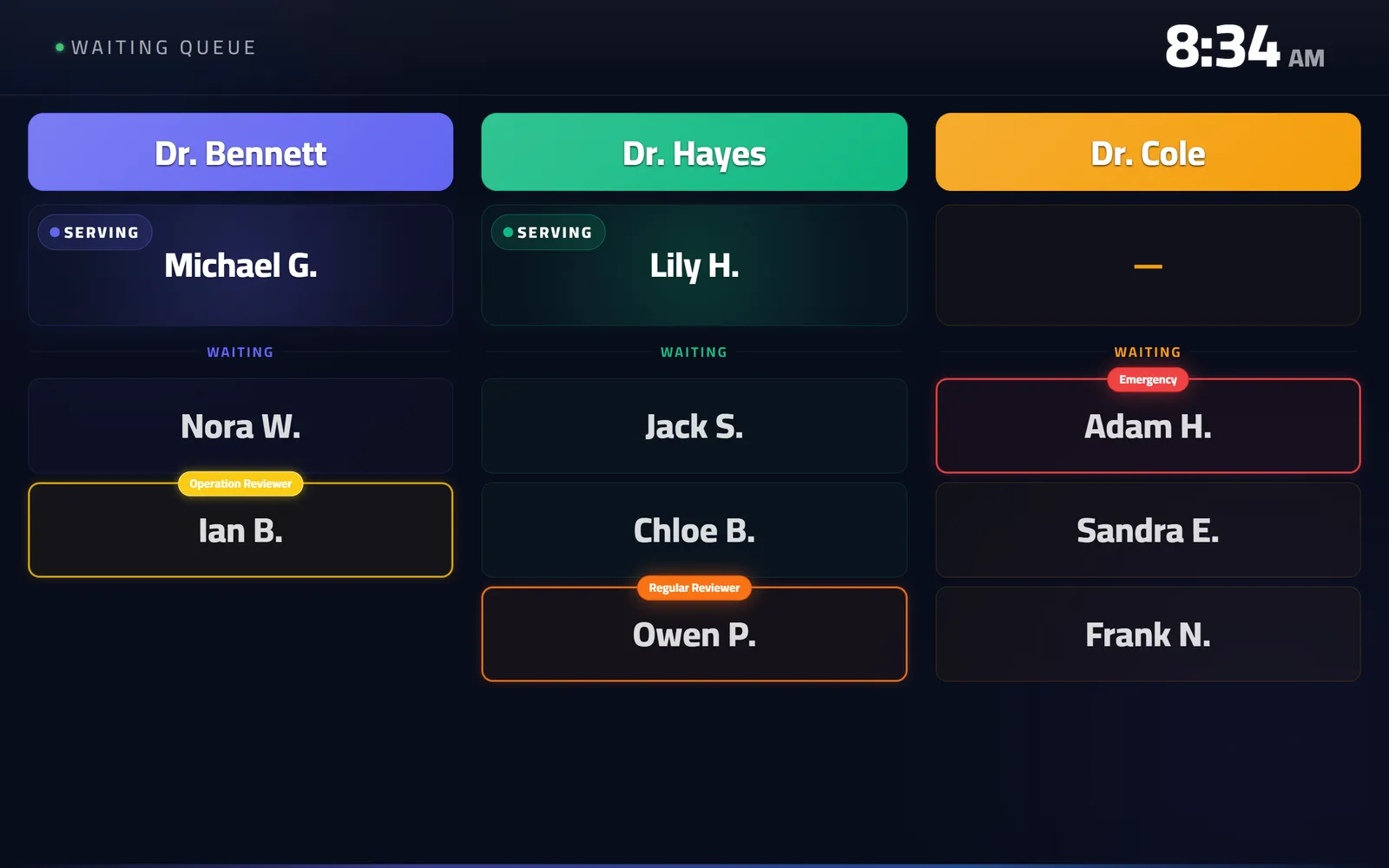
It shows who is being seen now and who is next, per doctor and per room. It updates the moment reception moves somebody on the board — no refresh button, nobody at the screen.
It also calls the next patient out loud, through the television's own speakers. In a clinic that prints tickets it announces the number; in a clinic that does not, it announces the name. That is the whole reason the screen matters: a waiting room where names are called is a waiting room where nobody has to keep watching a display.
And it recovers by itself. The page reloads after a deployment and comes back to the same state. That is a requirement, not a nicety. A screen mounted above a door on Thursday has to still be right on Sunday, with nobody having climbed up to it.
What it costs
If the clinic already has a television in the waiting room, nothing. If it does not, a screen and a streaming stick are ordinary retail purchases at ordinary retail prices, bought from anyone, replaceable by anyone.
That is the practical difference from a hardware-based system, and it is not really about the purchase price. Equipment bought as part of a queue system is equipment only that vendor services. A television is a television.
Setting up the screen, step by step
Pairing a television takes a few minutes and nobody technical:
- On the television, open queue.care/ds in its browser. The screen shows a four-digit code, valid for five minutes.
- In QueueCare's screen settings, enter the code and choose what this screen shows: the whole clinic, one doctor, or one room.
- Select the screen once with the remote. Browsers do not play sound until someone has touched the page, and that one press is what lets the screen call names aloud.
- Leave it. The screen follows every change on the board as it happens, and reloads by itself after an update.
Is it compatible with any TV or monitor?
Yes, as long as something attached to it runs a web browser. What differs is what has to be bought, and who can replace it:
| Option | Extra hardware | Works with a TV you already own | Who can replace it |
|---|---|---|---|
| The smart TV's own browser | None | Yes | Any electronics shop |
| A streaming stick or Android TV box | A stick, bought anywhere | Yes, through HDMI | Any electronics shop |
| A spare laptop or mini PC | One you may already have | Yes, through HDMI | Anyone |
| A queue vendor's own display hardware | The vendor's box or player | Usually | The vendor |
| No screen: reception calls names aloud | None | No TV needed | Nothing to replace |
Questions clinics ask before they start
Does the screen need to be on the same network as reception?
No. The screen loads a web page over the internet, so it only needs a connection — the same wifi as reception is convenient but nothing depends on it.
What happens if the television is switched off overnight?
Nothing is lost. The queue lives in the cloud, not on the screen. Switch the television back on, the page opens, and it shows the current state.
Can one clinic run more than one screen?
Yes, and they do not have to show the same thing. A screen can be pointed at one doctor, one room, or the whole clinic, so a corridor display and a main waiting-room display can each show what belongs to them.
Do we need a ticket printer as well?
Only if you want printed numbers. Patients can check in from their own phone by scanning a QR code at the door, in which case there is nothing to print and nothing to dispense.
Why does the screen ask to be clicked before it speaks?
Browsers refuse to play sound on a page nobody has touched. One press on the remote, once, and the screen can call names aloud from then on.
Related guides
- What is the best way to call the next patient in a waiting room?
Say it out loud and show it at the same time. A spoken announcement reaches the patient who is not looking; a screen reaches the one who did not hear.
- Does clinic queue software actually work in Arabic?
QueueCare does, completely: right-to-left layout rather than a mirrored English one, a spoken Arabic call on the waiting-room screen, Arabic printed tickets, and Arabic names throughout the queue.
- How long does it take to set up a clinic queue system?
A clinic is usually taking real patients the same morning. Add your doctors, rooms and desks, print the QR code for the door, and open the screen URL on the television.
- How much does a clinic queue management system cost?
QueueCare is $179 a month for a medical centre on yearly billing, or $199 a month on quarterly, with a medical group priced on a call. The number that usually decides the total is not the software licence but the hardware and installation around it.
See it with your own queue in it.
Open the demo and you are standing inside a working clinic — doctors mid-session, patients in line, screens calling names. Nothing to install, nothing to sign.
Open the live demo