Do patients have to download an app to join a clinic queue?
No. Patients scan a QR code at the clinic door and register in their browser, then follow their place in the queue from the same page. No download, no account, no password.
By ATA ATA, practising optometrist · Last updated:
An app is the wrong ask
Patients should not have to download anything: a patient is in the clinic once, and finding an app store, searching, downloading, waiting, opening and creating an account is more effort than a queue is worth. They will not do it. They will ask the receptionist instead, which is the exact interruption the system exists to prevent.
Clinic staff are a different case: they use the software every day, and a real interface is worth having. Patients are not staff, and a design that treats them as though they were is a design that quietly returns everybody to the front desk.
What actually happens
There is a QR code at the clinic door, on the reception desk, or both. It is a printed sheet; there is nothing electronic about it.
- The patient points their camera at it. Every phone sold in the last several years opens the link from the camera app itself.
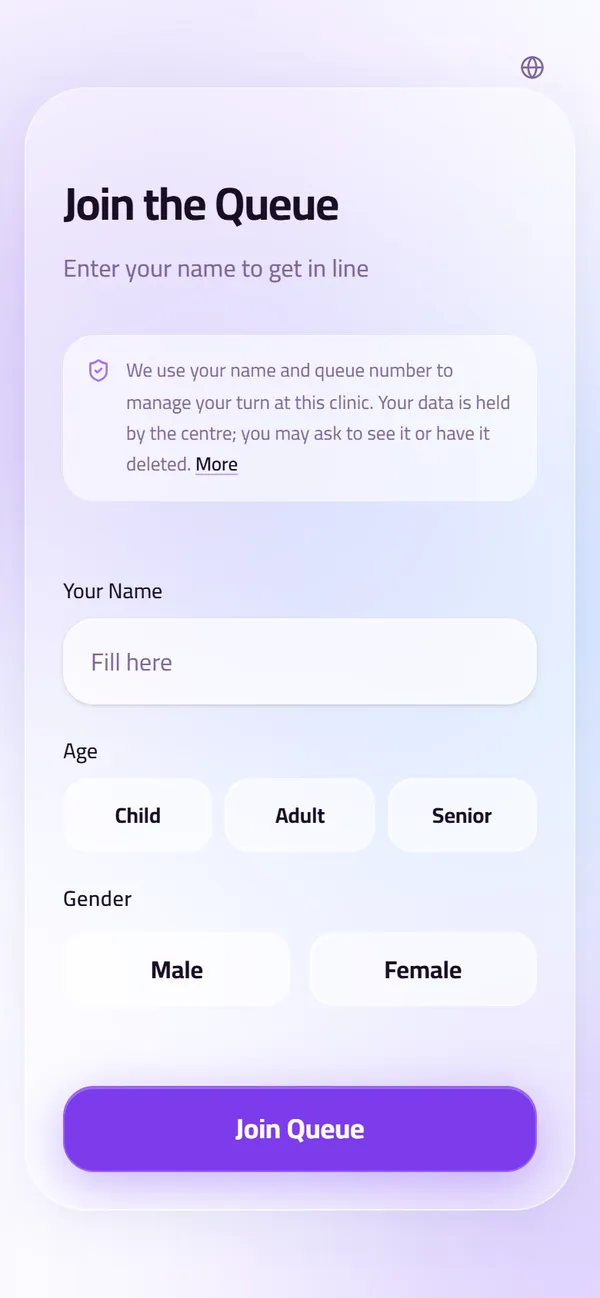
- A web page opens. They enter their name and whatever the clinic asks for — no account, no password, nothing to remember.
- They are in the queue, and the same page shows their place in it, updating as the queue moves.
- They can sit down, or step outside, and watch their turn approach from where they are.
The patients who do not have a smartphone
Some do not, and a system that only works for the ones who do is not a system a clinic can run.
Reception adds them to the same queue from the desk, in a few seconds, and they appear on the same board and are called by the same waiting-room screen. A clinic that prints tickets can hand them a number instead. Nothing about the queue depends on the patient having a device.
That is the test worth applying to any check-in system: not what it does for the patient with a new phone, but what it does for the patient without one.
What it changes in the room
The two questions a receptionist hears all day — when is my turn, and how many people are ahead of me — are answered on the patient's own screen, by the patient, without anybody being asked.
The waiting-room display carries the same answer for everyone else, and calls each name aloud. A patient who is not watching a screen does not need to be.
Setting up QR check-in at the reception desk
Implementing it takes one sheet of paper. QueueCare generates the clinic's own QR code; print it and put it where patients arrive — on the door, on the reception desk, or both. From then on:
- The patient scans it and enters their name and the few details the form asks for.
- Their card appears at once on the reception board, in the general waiting column, marked as a phone check-in.
- Reception sends it to the right doctor with one drag, and from then on the patient's phone shows their place — how many patients are ahead of them — updating as the queue moves.
- Patients without a phone are added from the desk into the same queue, so the room never runs two systems.
A check-in kiosk with nothing to download
A QR code at the door is a check-in kiosk with nothing to download. It does what clinics want a kiosk for — patients checking themselves in without queuing at the desk — with the patient's own phone as the kiosk: no touchscreen to buy, clean or repair, no app, and no line forming in front of one machine at nine in the morning.
The patients a kiosk would leave out anyway — no smartphone, or no wish to use one — are the ones reception adds by hand, in the same queue, called by the same screen.
| Option | Hardware for the clinic | Patient installs or signs up | Reception work per patient | Works without a smartphone |
|---|---|---|---|---|
| Paper sign-in sheet | None | Nothing | Every name read and entered by hand | Yes |
| Reception types every patient in | None | Nothing | Every patient, at the desk | Yes |
| Self-service kiosk | A touchscreen kiosk or a tablet stand | Nothing | Little, while the kiosk works | Yes, if they can use the touchscreen |
| A patient app | None | An app download and an account | Little | No |
| QR code opened in the phone's browser (QueueCare) | A printed QR sheet | Nothing | Only for patients without a phone | Yes — reception adds them |
Questions clinics ask before they start
Does the patient have to give a phone number?
That is the clinic's choice. The check-in form asks for what the clinic configures; a name is enough to hold a place in the queue.
What if the patient closes the page by accident?
Scanning the QR code again returns them to the same place. Their position lives in the queue, not in the browser tab.
Does it work on an old phone?
It is an ordinary web page, so anything with a browser opens it. A phone with no QR scanner in the camera can still be handed the link, or checked in by reception.
Does the patient need the clinic's wifi?
No. Any connection works, and the clinic does not have to put visitors on its network to run a queue.
Is a paper sign-in sheet a privacy problem?
Under the US HIPAA rules it is allowed, as long as it shows only what is needed to sign in. The US Department of Health and Human Services says a sign-in sheet may not display the medical problem the patient is there for.
Sources
- May physician's offices use patient sign-in sheets or call out the names of their patients in their waiting rooms? (FAQ 199) — U.S. Department of Health and Human Services, 2022
Related guides
- How do you print sequential ticket numbers for a patient queue?
Connect a 58 mm or 80 mm thermal receipt printer to the reception computer and let the queue system print the next number for the chosen doctor. In QueueCare each doctor's line counts up from its own starting number, restarts every day, and never issues the same number twice — even when a patient moves to another doctor.
- How do you reduce crowding in a clinic waiting room?
Give the answer somewhere other than the reception desk. Patients cluster at the desk because it is the only place that knows when their turn is, and they disperse the moment that stops being true.
- How do you run walk-ins and appointments in one clinic queue?
Put both on the same ordered board and let reception decide the order in the moment. The conflict between a booked patient and a walk-in is a judgement call, and software that automates it makes the wrong call in public.
See it with your own queue in it.
Open the demo and you are standing inside a working clinic — doctors mid-session, patients in line, screens calling names. Nothing to install, nothing to sign.
Open the live demo