How do you reduce crowding in a clinic waiting room?
Give the answer somewhere other than the reception desk. Patients cluster at the desk because it is the only place that knows when their turn is, and they disperse the moment that stops being true.
By ATA ATA, practising optometrist · Last updated:
It is not the wait. It is not knowing
A patient will sit for forty minutes without complaint if they know it is forty minutes. The same patient becomes anxious after ten if nobody has told them anything, and an anxious patient walks to the desk.
That is the whole mechanism. Crowding is not a volume problem to be solved with more chairs; it is an information problem, and the information exists — it is just locked inside one receptionist's head.
Why they cluster at the desk
Because the desk is the only terminal. Every patient who wants to know where they are has exactly one way to find out, and it involves standing up and interrupting the person who is checking somebody else in.
Which slows that check-in, which lengthens the queue, which produces another anxious patient. The queue at the desk is not a symptom of the waiting room being busy. It is what makes the waiting room busy.
What changes when the answer is visible
Three things, in the order they take effect:
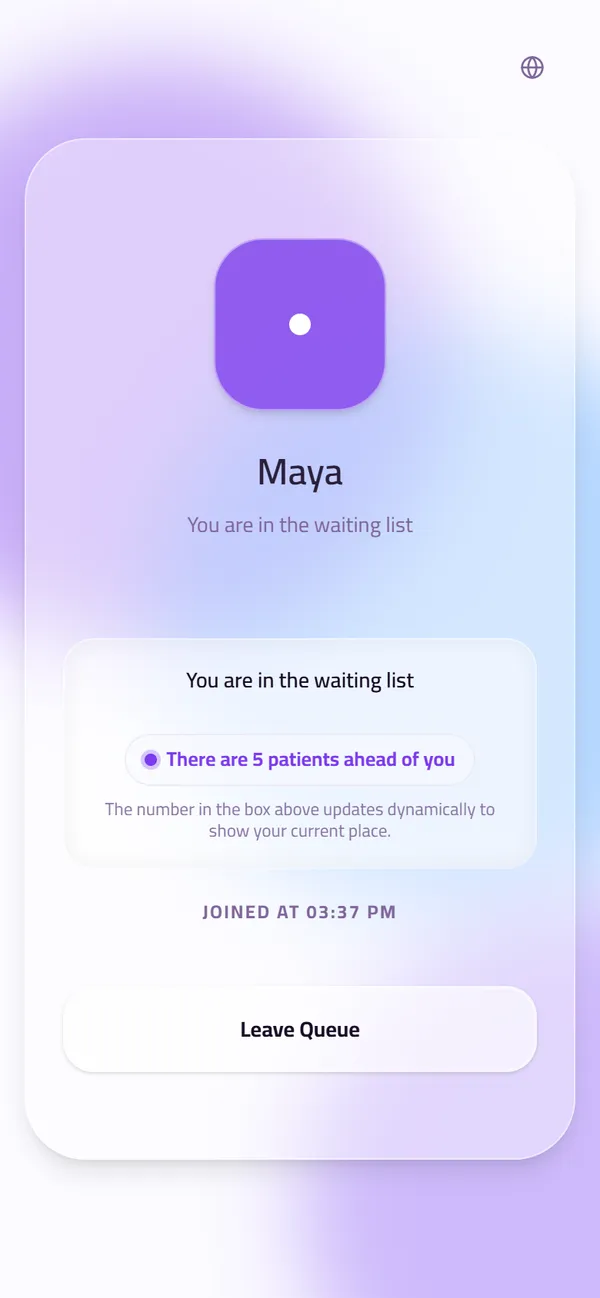
- The patient can see their own position from their seat, on their own phone, without asking. The reason to stand up disappears.
- The waiting-room screen shows the same thing to everybody at once, so a patient who is not looking at a phone is not excluded from knowing.
- The screen calls the next name out loud, which means nobody has to watch anything at all. Attention returns to the room.
Let people leave the room
The strongest thing a visible queue does is give a patient permission to be somewhere else. Three places back and twenty minutes out means a coffee, a phone call, or a seat outside where the air is better.
A waiting room with a third of its patients elsewhere is not a fuller waiting room managed better; it is an emptier one. And every patient who left is one who is not standing at the desk asking how long.
What this does not fix
If a clinic books three patients into the same ten minutes, no amount of visibility will make the room comfortable. It will simply make the overbooking legible to everybody in it.
That is worth knowing before buying anything. A queue system makes a scheduling problem visible; it does not make it disappear. What it does remove is the crowding that was never about scheduling in the first place.
Questions clinics ask before they start
Does this work in a walk-in clinic with no appointments?
It works better there. A walk-in queue is exactly the case where nobody knows their position, so making it visible removes the most uncertainty.
What about patients who do not want to use their phone?
The waiting-room screen carries the same information for the whole room, and calls each name aloud. Nothing about knowing your position requires a device.
Will patients leave and miss their turn?
They see their position update as it moves, so they come back before it arrives. A patient who has left is also one the screen can call by name when they return.
Related guides
- How do you reduce patient wait times at a clinic?
Measure the wait per doctor and per hour first, then fix what the numbers show — usually doctors starting late, patients arriving long before they can be seen, and one doctor's line overloaded while another is free. Showing patients where they stand does not shorten the wait, but it makes it far easier to bear.
- Do patients have to download an app to join a clinic queue?
No. Patients scan a QR code at the clinic door and register in their browser, then follow their place in the queue from the same page. No download, no account, no password.
- How long should patients wait before seeing the doctor?
No longer than 30 minutes is the standard most often cited: it is the office-wait limit used by the US Military Health System and California's managed-care regulator. Recent US survey data puts the typical waiting-room wait at about 13 minutes. Patients judge a wait less by its length than by whether they know how long it will be.
See it with your own queue in it.
Open the demo and you are standing inside a working clinic — doctors mid-session, patients in line, screens calling names. Nothing to install, nothing to sign.
Open the live demo