How do you print sequential ticket numbers for a patient queue?
Connect a 58 mm or 80 mm thermal receipt printer to the reception computer and let the queue system print the next number for the chosen doctor. In QueueCare each doctor's line counts up from its own starting number, restarts every day, and never issues the same number twice — even when a patient moves to another doctor.
By ATA ATA, practising optometrist · Last updated:
Why number patients at all
A number keeps a patient's name out of the waiting room. The screen can show and call “14, room 2” instead of a full name, and the order is plain to everyone: nobody has to argue about who came first.
It also gives reception something short to work with. “Fourteen” is quicker to say, to find on the board and to hear across a room than a name that three patients share.
What a good numbering scheme needs
A good numbering scheme needs four rules, because printing the next number is easy and printing the right one on a busy morning is not:
- A separate run of numbers for each doctor, starting far enough apart that they never collide — for example 1, 301 and 501 for three doctors.
- A fresh start every day, without anyone resetting a counter.
- No number issued twice in a day — not when a patient leaves, and not when a patient is moved to another doctor. The number on their paper stays theirs.
- Room for special cases, such as a separate line for follow-up or pre-operation patients, so they do not take numbers out of a doctor's own run.
Do you need a ticket machine?
No. An ordinary thermal receipt printer — the kind shops use — on 58 mm or 80 mm paper, connected to the reception computer, is enough. There is no ticket kiosk to buy and nothing to install on a server: the queue system sends the ticket to the printer through the browser, like any other print.
The options, side by side
Clinics hand out numbers in one of three ways. They differ in how much the numbers know about the queue.
| Option | Separate numbers per doctor | Restarts every day by itself | Linked to a live queue | What you need |
|---|---|---|---|---|
| Handwritten numbers or reusable cards | Only with separate pads or sets | By hand | No | Paper or cards |
| A tear-off ticket dispenser | No — one run for everyone | By hand | No | The dispenser and ticket rolls |
| Printed at the desk by the queue system (QueueCare) | Yes | Yes | Yes — the number is the patient's place on the board and the screen | A 58 or 80 mm thermal receipt printer |
What a QueueCare ticket shows
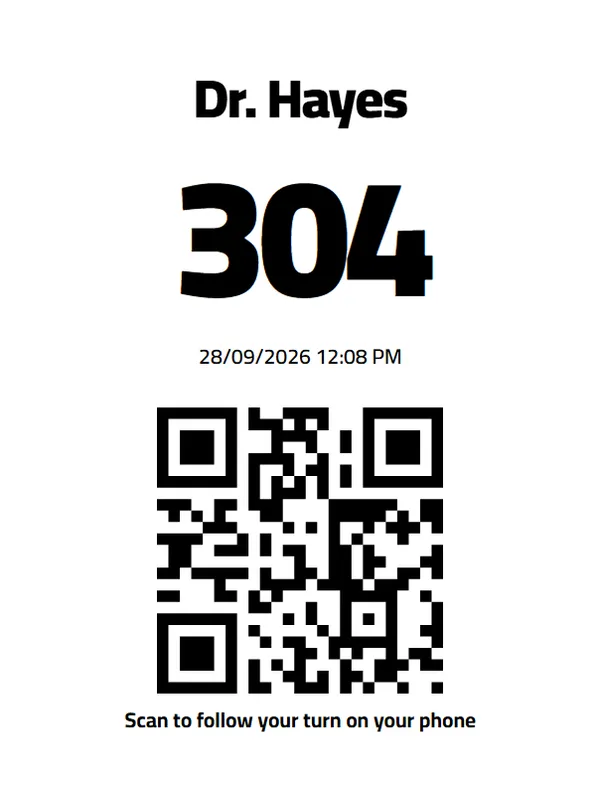
Each ticket carries the patient's number, the name of the doctor's room (or the clinic's name), the date, and a QR code. Scanning the code opens the patient's own place in the queue on their phone, so they can see how many patients are ahead of them and step outside while they wait.
The same number is what the waiting-room screen shows and calls aloud, in Arabic or English, when the patient's turn comes.
Setting it up
Each doctor's starting number is part of the clinic's settings. Printing is switched on for a clinic by the QueueCare team once the printer is connected, with the paper width set to 58 or 80 mm — a clinic that does not print simply never sees a print dialog. Patients who check in with the QR code at the door get their number on their phone, with nothing to print.
Questions clinics ask before they start
Do the numbers restart every day?
Yes. Each doctor's line starts again from its starting number every day, with nobody resetting anything.
What happens to a number when a patient leaves?
It stays reserved. A number issued that day is never issued again, so two patients can never hold the same one.
If a patient moves to another doctor, does their number change?
No. The number is a receipt the patient is already holding; the board changes where they are seen, not who they are in the queue.
Do patients have to take a paper ticket?
No. A patient who checks in by scanning the QR code at the door gets their number and follows their place on their phone.
Related guides
- What is the best way to call the next patient in a waiting room?
Say it out loud and show it at the same time. A spoken announcement reaches the patient who is not looking; a screen reaches the one who did not hear.
- Do patients have to download an app to join a clinic queue?
No. Patients scan a QR code at the clinic door and register in their browser, then follow their place in the queue from the same page. No download, no account, no password.
- How do you run walk-ins and appointments in one clinic queue?
Put both on the same ordered board and let reception decide the order in the moment. The conflict between a booked patient and a walk-in is a judgement call, and software that automates it makes the wrong call in public.
- Can a clinic queue system be customised to our workflow?
Yes. Every centre that subscribes to QueueCare can ask for features built around its own workflow in its first month, at no extra cost, within a scope agreed in writing.
See it with your own queue in it.
Open the demo and you are standing inside a working clinic — doctors mid-session, patients in line, screens calling names. Nothing to install, nothing to sign.
Open the live demo